View Category: Omatic Cloud

Omatic Cloud DBA Assistant: Your New Data Management BFF

Between importing fresh data, maintaining pristine records, and generating lists for colleagues, being a nonprofit database administrator can feel like holding down several full-time jobs at once. That’s why we rolled out a new feature to help lighten your workload: Omatic’s DBA Assistant!

With the Database Administrator Assistant in Omatic Cloud for ImportOmatic Plus (IOM+) users, you can create formulas to update data in your CRM. Instead of using Omatic Cloud to transform and route data between two systems, by selecting your system of record as the source and destination for your formulas, you can update and clean your data in a snap. Harness the power of automation to conduct mass updates to your data—while saving time.
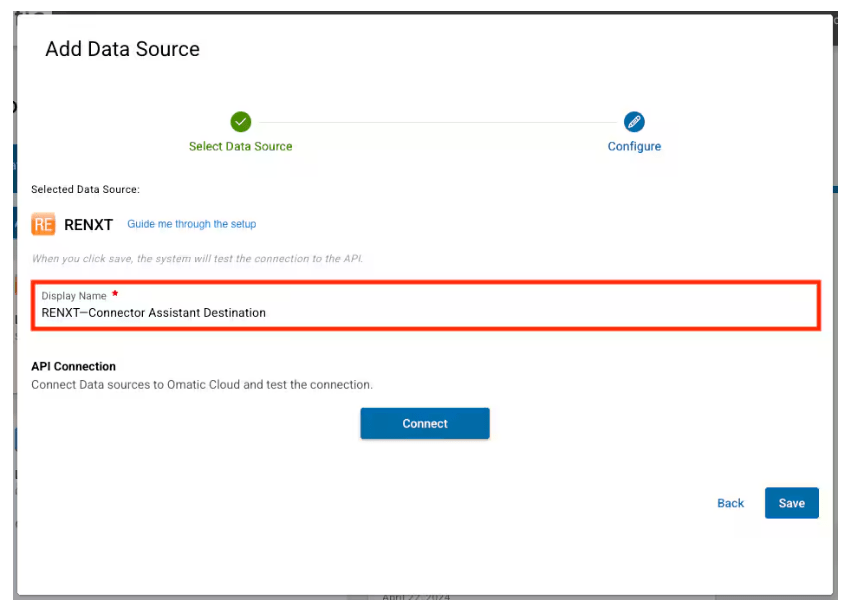
How Database Assistant Works with Raiser’s Edge NXT

  1. Connect your Raiser’s Edge NXT environment to Omatic twice (one connection will serve as the data source and the other connection will serve as the destination)
  2. Create a query or list in Raiser’s Edge NXT to gather the data you would like to modify with Omatic Cloud.
  3. Create a formula in Omatic Cloud to configure the mapping and transformations that you need to apply to your data.
  4. Run the formula to pull the data from Raiser’s Edge NXT (using your query or list), apply your mapping and transformation settings, and send the updated data back to your Raiser’s Edge NXT environment.
Raiser's Edge NXT as a destination in Omatic Cloud

How Database Assistant Works with Salesforce

  1. Connect your Salesforce environment to Omatic twice (one connection will serve as the data source and the other connection will serve as the destination)
  2. Create a Salesforce report to gather the data you would like to modify with Omatic Cloud.
  3. Create a formula in Omatic Cloud to configure the mapping and transformations that you need to apply to your data.
  4. Run the formula to pull the data from Salesforce (using your report), apply your mapping and transformation settings, and send the updated data back to your Salesforce environment.

This feature is a game-changer for busy database administrators. Instead of modifying records by hand, you can create simple formulas to refresh your data weekly, daily, or at any interval you choose.

You can use the DBA Assistant Feature to:

  • Update identification information
  • Refresh titles
  • Modify address information
  • Add constituent codes
  • And more!

This new feature has the power to revolutionize data management for your organization. By creating simple formulas to modify, map, and transform your data, you can simplify hours of manual work and focus on what matters. Refreshing your data has never been easier. Get started with the DBA Assistant in Omatic Cloud.


Please note that this feature is not available for all systems of record and Omatic Cloud solutions. To find out if you have access to the DBA Assistant feature in Omatic Cloud, contact your Omatic representative.

Ready to explore the power of ImportOmatic+ in Omatic Cloud? Book a demo today!

Related Posts

New Features for Omatic Cloud: April 2026

New Features for Omatic Cloud: April 2026

Get a look at the major Omatic Cloud releases for April 2026, including an Eventbrite connector, support for phone number matching with Raiser's Edge NXT, Post-to-General Ledger improvements in Kindsight, and more.

Read More
New Features for Omatic Cloud: April 2026: Read More
How Nonprofit Event Data Can Drive Year-Round Engagement

How Nonprofit Event Data Can Drive Year-Round Engagement

In this article, we’ll walk you through how to treat events as a mechanism for gathering, storing, and using supporter data and why you should.

Read More
How Nonprofit Event Data Can Drive Year-Round Engagement: Read More
New Features for Omatic Cloud: March 2026

New Features for Omatic Cloud: March 2026

Read about the major feature updates for Omatic Cloud in March 2026, including the Shopify Connector, Custom Code Transformations, and UK Gift Aid support.

Read More
New Features for Omatic Cloud: March 2026: Read More