3 Event Management Tricks with EventOmatic


Are you a current EventOmatic user looking for additional ways to utilize the software to your advantage? Here are a few lesser-known tips that can end up being huge time-savers for you!
1) Search Field Magic
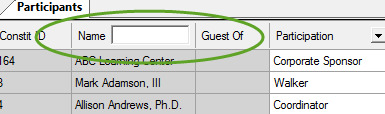
When trying to quickly search for an event participant, the “Name” search box can be very helpful. Did you know that you can get search results from just part of the name or even just initials? EventOmatic starts searching through participants immediately when you start to type into this field, which means that you should hopefully find the record you seek rapidly. Note – if searching with initials, include a space between the letters. For example, typing “br” will find Brian, Brad, and Brent in your list, but if you type in “b r” you will find Brenda Roberts, Bob Richards, and Brooklyn Renovations in the list!
2) Ask Query Magic
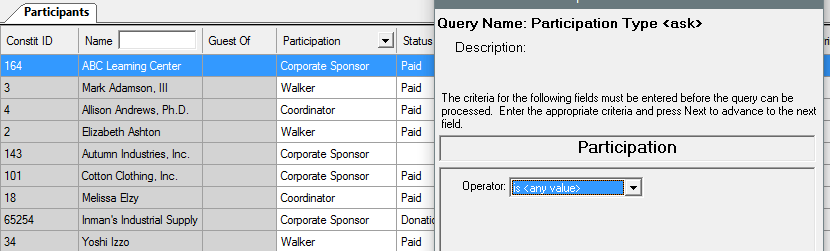
Are you tired of constantly creating queries to filter on? Did you know that using a participant query with the operator can ease your burden? Ask queries allow you to change the criteria upon the search, so you can create a general ask query on something like participation. Then, you can change the ask criteria over and over again to filter within participation types without ever leaving EventOmatic!
3) Name Tag Magic
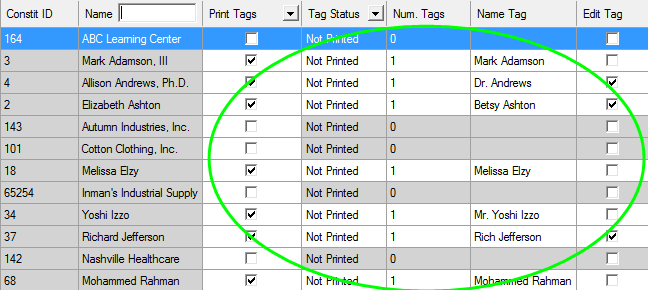
Are nametag preferences for your event causing you unwanted stress? Be sure to include columns for nametags and place cards in your event grid to allow for easy management leading up to the event! Applying default sets to the grid participants can fill in the blanks here with name formality defaults of your preference. Then, you can choose to double-click on any row in the grid to edit any of these items on the fly to personalize for attendees and volunteers. Best of all – you can export the grid into a csv file for easy mail-merging magic before you print them!
We hope these EventOmatic tips and tricks can aid you in your event management software skills for the Raiser’s Edge – stay tuned to blogs for future tips from the pros at Omatic to help keep your sanity!
Sign up to receive our e-newsletter with the latest tips, technology, trends, and upcoming events.


