It’s All in the Name! Proper Casing Made Easy with ImportOmatic for Raiser’s Edge™


With more and more mobile giving, we’re finding that data is becoming sloppier. Most donors are not taking the time to ensure capitalization is correct when they’re trying to fill out a donation form on their phone. Some fundraising sites try to clean up this data, but others just output exactly what the donor entered. Does this look familiar?
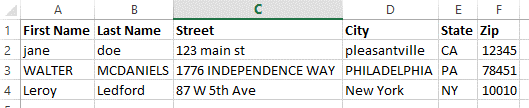
The primary issue is that capitalization is all over the place. Some rows are in all caps, others in all lower, and a few people took the time to capitalize their information correctly. ImportOmatic (IOM) can fix most of those variations with the Proper Case function, but it’s important to understand how it does so. Knowing the limitations of the tool will protect you from surprises.
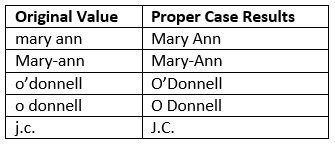
Proper Case in IOM works like title casing, meaning that the first letter of each word is capitalized. So, if we have spacing or punctuation to define “words,” we can ensure that names are capitalized according to common conventions:
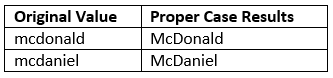
Additionally, Proper Case works well when names start with “Mc.” For these names, we can reasonably assume that any letter following “Mc” should be capitalized:
However, we can’t assume Proper Case will work for all patronymic prefixes. Common patronymic prefixes include “Mac,” “De,” “La,” etc. For these, IOM simply cannot assume the letter immediately following should be capitalized. Take these examples where capitalizing the next letter would be incorrect:
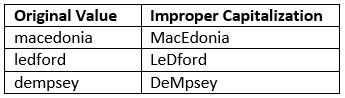
Therefore, we have to compromise. To ensure that we are not improperly capitalizing words that happen to start with the same letters as patronymic prefixes, we only set an exclusion for “Mc.” The Proper Case rules apply to every row, even if the original capitalization is preferred:
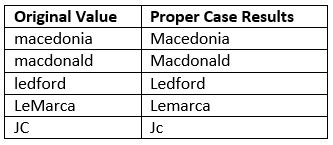
To sum it up, the ImportOmatic Proper Case function does a great job of cleaning up capitalization using assumptions that can apply across most data sources and constituent bases. However, you know your data best. If the incoming data is already very clean, or if your data contains a lot of names with unique capitalization and patronymic prefixes, perhaps the Proper Case function isn’t a good fit for this import.
To learn more about other ways ImportOmatic can correct incoming names and addresses, check out the Omatic Data Service!
Sign up to receive our e-newsletter with the latest tips, technology, trends, and upcoming events.


