How ImportOmatic Saved Valentine’s Day


This week a client contacted us in a bit of panic. They had worked with a partner on a very large Valentine’s Day promotion which was huge success. They received all the transactions in a flat file and needed to import them immediately so they could process them through EFT in The Raiser’s Edge® gift batches. The file contained the total gift amount and the selected package and quantity which were to be imported as gift benefits, but it did not contain the benefit cost, the total benefit cost, or the adjusted receipt amount for the gift.
Our client needed to import the gifts immediately to process the payments via EFT, but did want them to have a receipt amount equal to the full gift amount. To sum it up, our problem was, given an import file with only a gift amount, benefit name, and benefit count, how can we determine gift benefit unit cost, total cost, and update the gift receipt amount to reflect the benefit costs? Using ImportOmatic’s API and the Dictionary functionality, you can calculate gift benefit costs and receipt amount. This process can be automated in 5 easy steps (6 steps if your boss is cool):
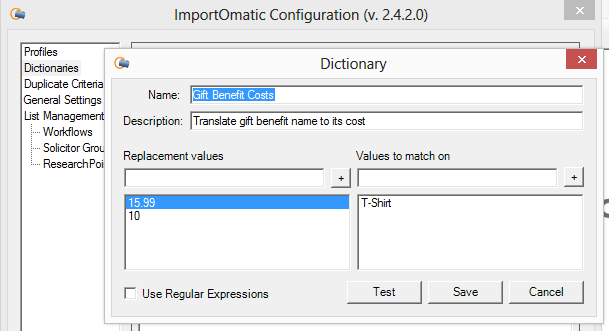
Step 1: Create a dictionary to translate the benefit name into its cost. It’s OK if you have multiple benefits that have the same cost, just add them all on the right-hand “Values to match on” column.
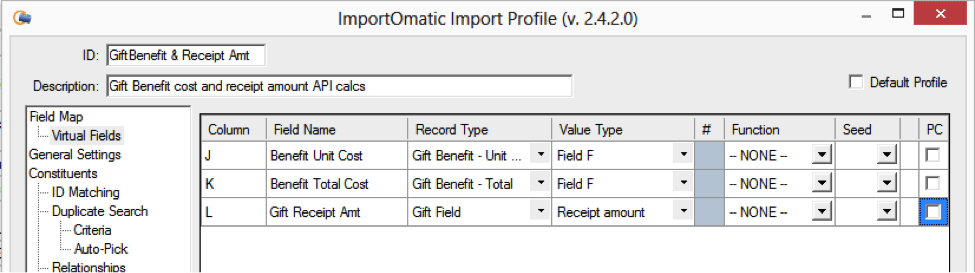
Step 2: Create the virtual fields in the ImportOmatic profile to hold the values we are going to calculate:
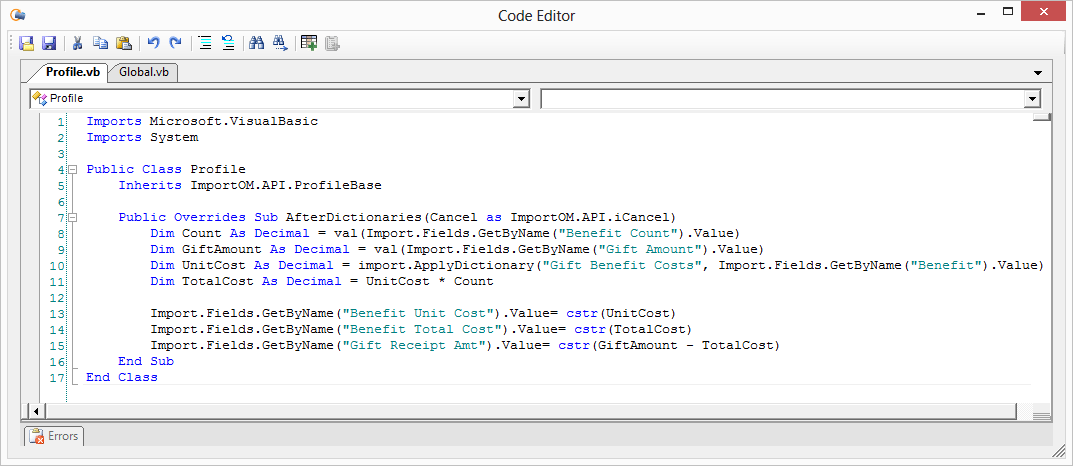
Step 3: Use the “AfterDictionaries” event to calculate your values. This probably could have been done from other events just as easily, but AfterDictionaries was as good as any.
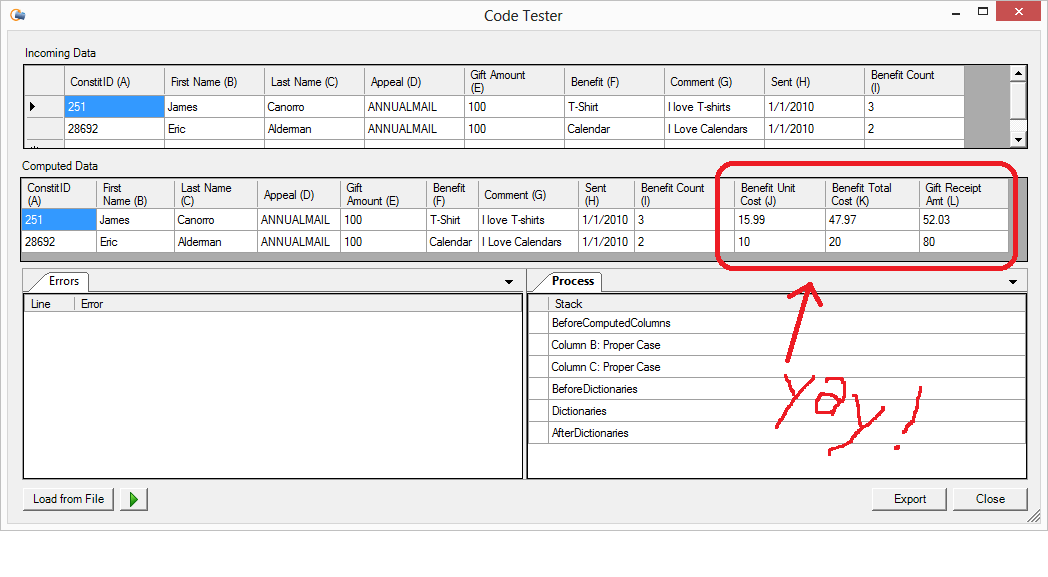
Step 4: Use the Code Tester to see if the values are computed correctly.
Step 5: Import file into a gift batch.
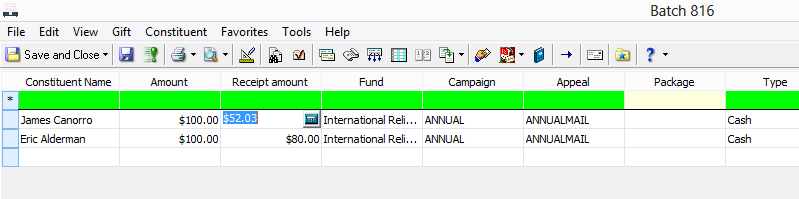
Step 6: Take the rest of Valentine’s Day off, you’ve earned it! 
This is just one example of what’s possible with the ImportOmatic API. If you are routinely doing manual data massaging or cleanup before an import, consider using the API to automate those tasks for you. Need help with it? Just ask! Several users are sharing their experience with the API in our ImportOmatic API User forum. And if you want it done for you, just contact your Omatic account manager and start a conversation about it. There is very little we can’t do with the API, and we’re always happy to discuss new ideas! Appendix A: API Code
Public Overrides Sub AfterDictionaries(Cancel as ImportOM.API.iCancel)
Dim Count As Decimal = val(Import.Fields.GetByName(“Benefit Count”).Value)
Dim GiftAmount As Decimal = val(Import.Fields.GetByName(“Gift Amount”).Value)
Dim UnitCost As Decimal = import.ApplyDictionary(“Gift Benefit Costs”, _
Import.Fields.GetByName(“Benefit”).Value)
Dim TotalCost As Decimal = UnitCost * Count
Import.Fields.GetByName(“Benefit Unit Cost”).Value= cstr(UnitCost)
Import.Fields.GetByName(“Benefit Total Cost”).Value= cstr(TotalCost)
Import.Fields.GetByName(“Gift Receipt Amt”).Value= cstr(GiftAmount – TotalCost)
End Sub
Sign up to receive our e-newsletter with the latest tips, technology, trends, and upcoming events.


