Order of Operations for Error-Free Raiser’s Edge™ Imports


Elevate your data quality with seamless imports! Discover how Omatic Cloud transforms data management for Raiser’s Edge NXT: Smarter Imports, Better Data: Omatic Cloud for Raiser’s Edge NXT.
Recently, an ImportOmatic user had an interesting issue with profiles. There was a 2-pass import setup, using a Skip Row dictionary to find and except all rows containing organization donors.

The problem was occurring with the second profile. The second profile was designed specifically for importing those organization records, but it was kicking them out as exceptions too! After looking into the profile, it became apparent that the profile was marked to ignore the column we were initially using to trigger the exceptions in our first pass. So why weren’t the organizations importing?
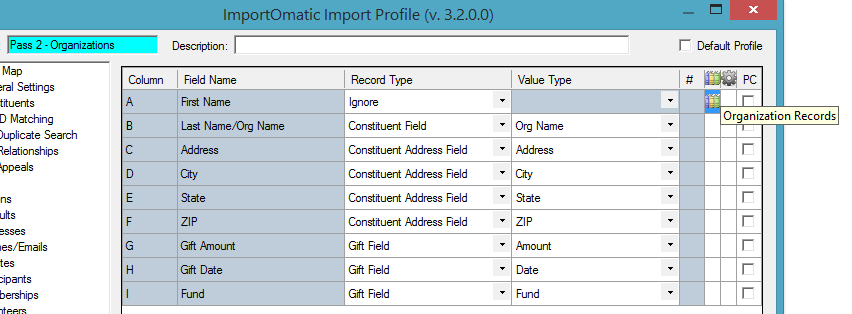
The answer was simple – we still had our Skip Row dictionary applied within the second profile. Even though we had ignored the column, the dictionary was still doing its job.
Remember learning the order of operations in math class? The order we add/subtract/multiply/divide affects the result of a calculation. The same is true for ImportOmatic. ImportOmatic follows a sequential order of operations each time you run an import. In the above example, the dictionary was applying prior to ImportOmatic recognizing that we didn’t need that column at all. Once we removed the dictionary, the import worked perfectly.
ImportOmatic’s order of operations can be divided into phases –
Phase 1 – Functions and Dictionaries
First things first, ImportOmatic applies functions and dictionaries. It makes sense because duplicate searching, matching code table entries, and considering whether a record should be excluded from an import are all determined by incoming data values. Those corrections are the first priority.
Phase 2 – Field Mapping
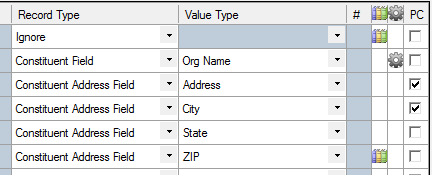
Next, ImportOmatic looks at the field mapping. Where should this value go in Raiser’s Edge? Should it be ignored entirely? Try to remember if you’ve applied a dictionary to a column that has already taken effect before getting to the field mapping instructions. This includes dictionaries that trigger exceptions.
Phase 3 – Profile Settings
Finally, ImportOmatic accounts for remaining profile settings that tell it how to handle data that may already be in Raiser’s Edge. Consider the Biographical fields – do we overwrite the old values, ignore the new values, and should that be seen in a comparison screen? Using side by side comparison is a helpful option for constituent field updates.

Knowing the basic order of operations for ImportOmatic makes troubleshooting unexpected outcomes and exceptions easier! Cheers to error-free imports!
Sign up to receive our e-newsletter with the latest tips, technology, trends, and upcoming events.


