What’s in a Name? Separating First and Last Names for Import into Raiser’s Edge™


Importing data into Raiser’s Edge can come with a host of challenges dependent on the data contained in the file you are importing. Among those challenges, separating first and last names for import when your file includes a full name can be a time-consuming task. Fortunately, ImportOmatic® greatly simplifies that process by using RegEx dictionaries to parse names into separate columns. “What are Regular Expression or “RegEx” dictionaries?” you ask…
Regular Expression is a programming language that allows you to find and replace parts of a field based on a set of parameters, rather than requiring an exact match to the entire field value. For example, you can replace “Boulevard” with “Blvd” in an address line while ignoring the number and street name, and for those times when you need to separate a column that contains a constituent’s entire name (ex. either “John Doe” or “Doe, John”), RegEx dictionaries may be your best friend! You may already be familiar with Excel’s text to columns function, which parses the name into two columns. However, having to do this before every import can be a real pain!
Elevate your data quality with seamless imports! Discover how Omatic Cloud transforms data management for Raiser’s Edge NXT: Smarter Imports, Better Data: Omatic Cloud for Raiser’s Edge NXT.
Here’s a way around it within an ImportOmatic profile:
1. In your Field Map, map the combined name field to Constituent Field > First Name.
a. Apply the First Name Only dictionary below, to isolate just the first name.
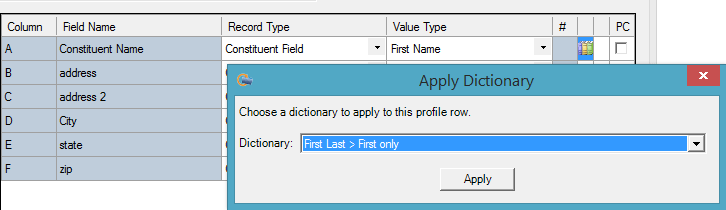
2. Then, create a virtual column in your Virtual Fields that copies the Constituent Name/First Name column.
a. Apply the Last Name Only dictionary, to isolate just the last name.
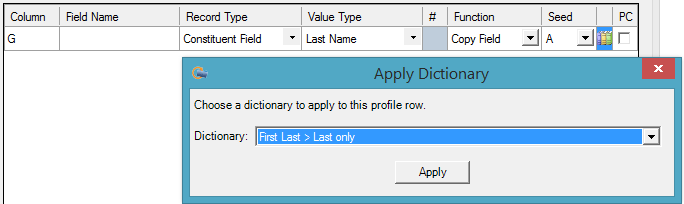
You can use this technique on name fields within any type of record, such as Constituent, Individual Relationship, etc. As always, test the dictionary against a few examples in your data to make sure you are happy with the results before you apply it.
Here are two examples of single-cell name formats you may see, followed by the Excel format of the dictionaries needed to isolate each part of the name.
*When you copy and paste from Excel to your dictionary, make sure to include the blank cells in the first column, as those are used as “blanks” to remove the unwanted part of the name.
Example 1: When your original data is formatted as “Doe, John”
First Name Only

Last Name Only

Example 2: When your original data is formatted as “John Doe” in a single cell
First Name Only

*Note that only the first name will be captured. For example, “Mary Ann Smith” will result in “Mary,” not “Mary Ann.”
Last Name Only

Using this approach is just one of the shortcuts for to saving time and energy during your import process. Looking for other ways? ImportOmatic is your best friend for faster, cleaner, automated importing!
The Raiser’s Edge™ is a trademark of Blackbaud, Inc.
Sign up to receive our e-newsletter with the latest tips, technology, trends, and upcoming events.


